ProPresenter Lyrics Export

Extract and export worship song lyrics from ProPresenter 7
View the Project on GitHub adamswbrown/propresenterlyricexport
PPTX Export Guide
| ← Back to Home | User Guide |
Export your ProPresenter playlist lyrics to beautifully formatted PowerPoint files in seconds.
Quick Export (3 Steps)
Exporting lyrics is simple:
Desktop App
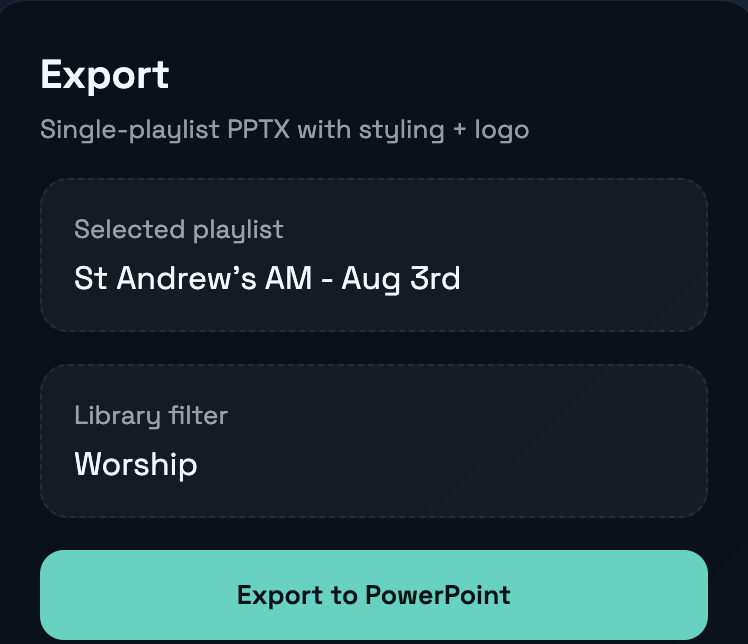
- Connect to ProPresenter
- Select your playlist
- Click “Export to PPTX”
That’s it! Your PowerPoint file is ready.
CLI
# Interactive mode - guides you through selection
propresenter-lyrics pptx

# Direct export - specify playlist UUID and output name
propresenter-lyrics pptx abc123 sunday-service
What You Get
Every export creates a professional PowerPoint with:
- Title slides for each song (song name, artist info)
- Lyric slides with clean, readable formatting
- Consistent styling throughout the presentation
- Ready to present - just open and go
Your exported file works in:
- Microsoft PowerPoint
- Google Slides
- LibreOffice Impress
- Keynote (with conversion)
Customizing Your Exports
Want to match your church’s branding? Customize fonts, colors, and more.
Desktop App Settings
Click ⚙ Settings to access all customization options:
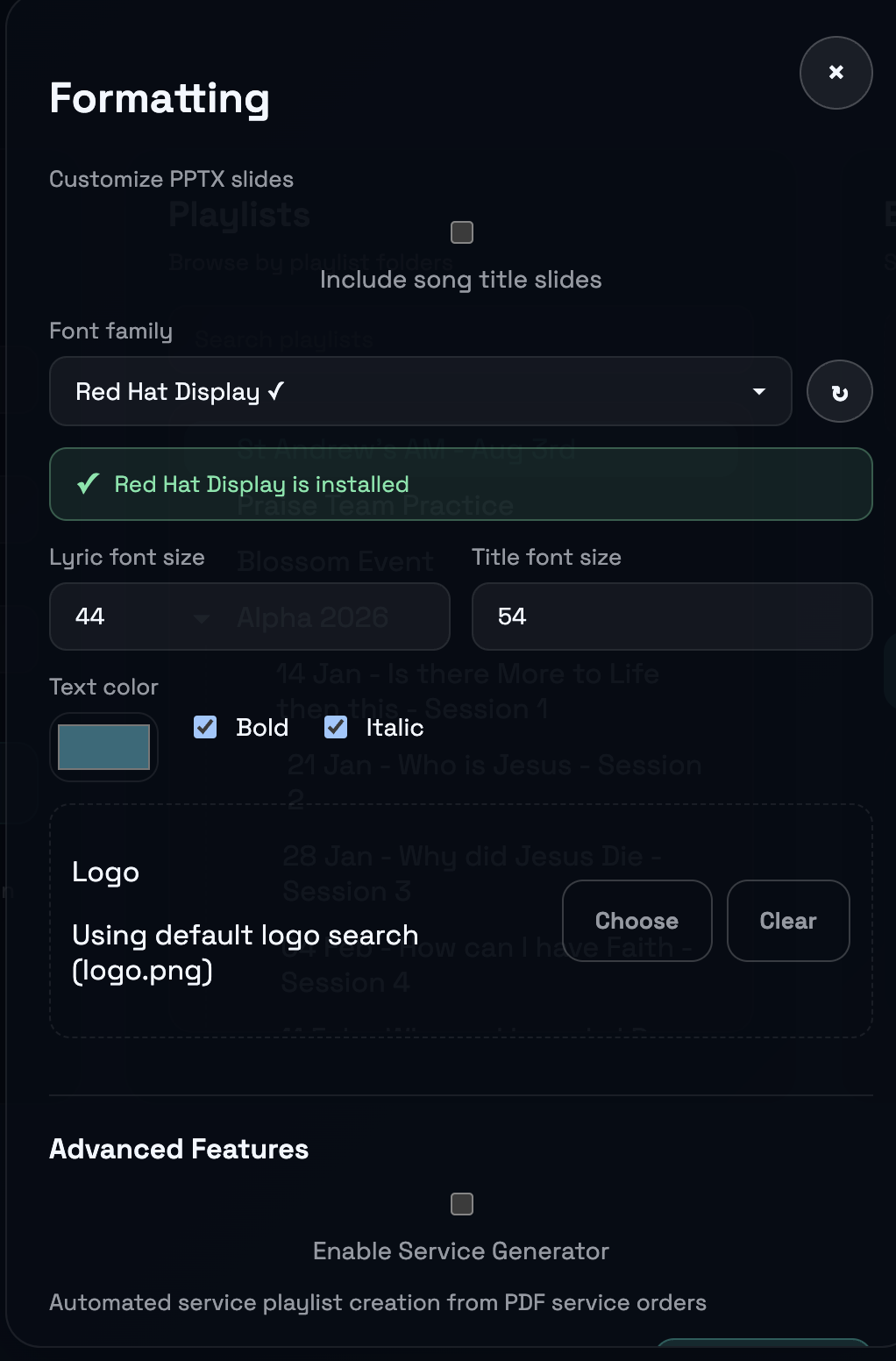
Quick Customization Options
| Setting | Default | What it does |
|---|---|---|
| Font | System default | Choose from 25+ presentation fonts |
| Text color | White | Any color via color picker |
| Font size | 44pt | Lyric text size (40-48pt recommended) |
| Title size | 54pt | Song title size |
| Bold | On | Makes text bolder |
| Italic | On | Adds italic styling |
| Logo | None | Add your church logo |
Fonts
Choosing a Font
The desktop app shows 25+ curated presentation-ready fonts:
- Green ✓ = Installed on your computer
- Gray ○ = Available to download (click to open Google Fonts)
Recommended fonts:
| Type | Best For | Examples |
|---|---|---|
| Sans-serif | Modern, clean | Arial, Open Sans, Roboto, Montserrat |
| Serif | Traditional, elegant | Georgia, Times New Roman, Merriweather |
| Display | Bold impact | Impact, Oswald, Bebas Neue |
Installing Missing Fonts
- Click the gray ○ next to the font name
- Google Fonts opens in your browser
- Download and install the font
- Click Refresh in Settings
Colors
Text Color
- Default: White (#FFFFFF)
- Tip: Light colors on dark backgrounds work best
- Click the color picker in Settings to choose any color
Background
- Default: Black (#000000)
- Tip: Dark backgrounds reduce eye strain and improve readability
Logo
Add your church or organization logo to title slides:
- Click Settings ⚙
- Browse to your logo image (PNG recommended)
- Logo appears on title slides automatically
Best practices:
- Use transparent PNG files
- Resolution: 300-1000px
- Square or landscape orientation
Style Presets
Quick combinations for common looks:
Modern Minimal
Font: Open Sans | Size: 44pt | Bold: Off | Italic: Off
Best for: Contemporary worship, clean aesthetic
Elegant Classic
Font: Georgia | Size: 48pt | Bold: On | Italic: On
Best for: Traditional services, formal events
Bold Impact
Font: Impact | Size: 52pt | Bold: On | Italic: Off
Best for: Youth services, high-energy worship
CLI Customization
Set options via environment variables:
# Font and size
export PP_FONT_FACE="Arial"
export PP_FONT_SIZE=44
export PP_TITLE_SIZE=54

# Colors (hex without #)
export PP_TEXT_COLOR=FFFFFF

# Formatting
export PP_BOLD=true
export PP_ITALIC=true

# Then export
propresenter-lyrics pptx abc123 output
Best Practices
For Readability
- Use high contrast (light text on dark background)
- Keep fonts 40pt minimum for audience visibility
- Avoid decorative or script fonts
For Consistency
- Use the same font throughout your service
- Keep logo subtle - don’t overpower the lyrics
- Test on your actual projector before Sunday
Technical Details
What Gets Exported
Each slide contains:
- Title slides (one per song)
- Song title in large text
- Album/Artist information
- Optional logo image
- Lyric slides (one per verse/section)
- Formatted lyrics text
- Consistent styling
- Metadata (embedded)
- Song information
- Export date/time
- Playlist name
Default Slide Layout
[Dark background]

                    SONG TITLE
                    Artist Name

    Verse lyrics appear here,
    centered and easy to read,
    with comfortable line spacing.
File Specifications
- Format: .pptx (Office Open XML)
- Typical size: 1-10MB
- Slide count: Varies by playlist (typically 50-200)
Troubleshooting
Font Looks Different
Problem: Font appears different than expected
Fix: The font must be installed on the computer opening the file. Use system fonts (Arial, Helvetica) for maximum compatibility.
Colors Look Wrong on Projector
Problem: Colors appear different on projector vs. screen
Fix: Projectors display differently. Test on your actual projector and use high-contrast combinations (white on black).
Logo Missing
Problem: Logo doesn’t appear in exported file
Fix: Verify the file path is correct and the image is PNG or JPEG format.
File Too Large
Problem: Exported file is 50MB+ (should be <20MB)
Fix: Compress your logo image or use system fonts instead of custom fonts.
Advanced: Batch Export
Export multiple playlists with consistent styling:
#!/bin/bash
export PP_FONT_FACE="Montserrat"
export PP_TEXT_COLOR="FFFFFF"
export PP_FONT_SIZE=44

for uuid in playlist1 playlist2 playlist3; do
  propresenter-lyrics pptx "$uuid" "export-$uuid"
done
See Also
- User Guide - Full app documentation
- CLI Guide - Command reference
- Getting Started - Installation