ProPresenter Lyrics Export

Extract and export worship song lyrics from ProPresenter 7
View the Project on GitHub adamswbrown/propresenterlyricexport
Getting Started
Get ProPresenter Lyrics Export up and running in just a few minutes.
Table of Contents
⚠️ CRITICAL: Configure ProPresenter First
Before installing or using this tool, you MUST configure ProPresenter correctly. Nothing will work without this step.
Enable Network API in ProPresenter
- Open ProPresenter 7
- Go to Preferences (or ProPresenter → Preferences on macOS)
- Click the Network tab
- Check the box: “Enable Network API”
- Note the Port number (default:
1025) - If connecting from another computer, note the IP address displayed
- Click OK or Save
- Restart ProPresenter for changes to take effect
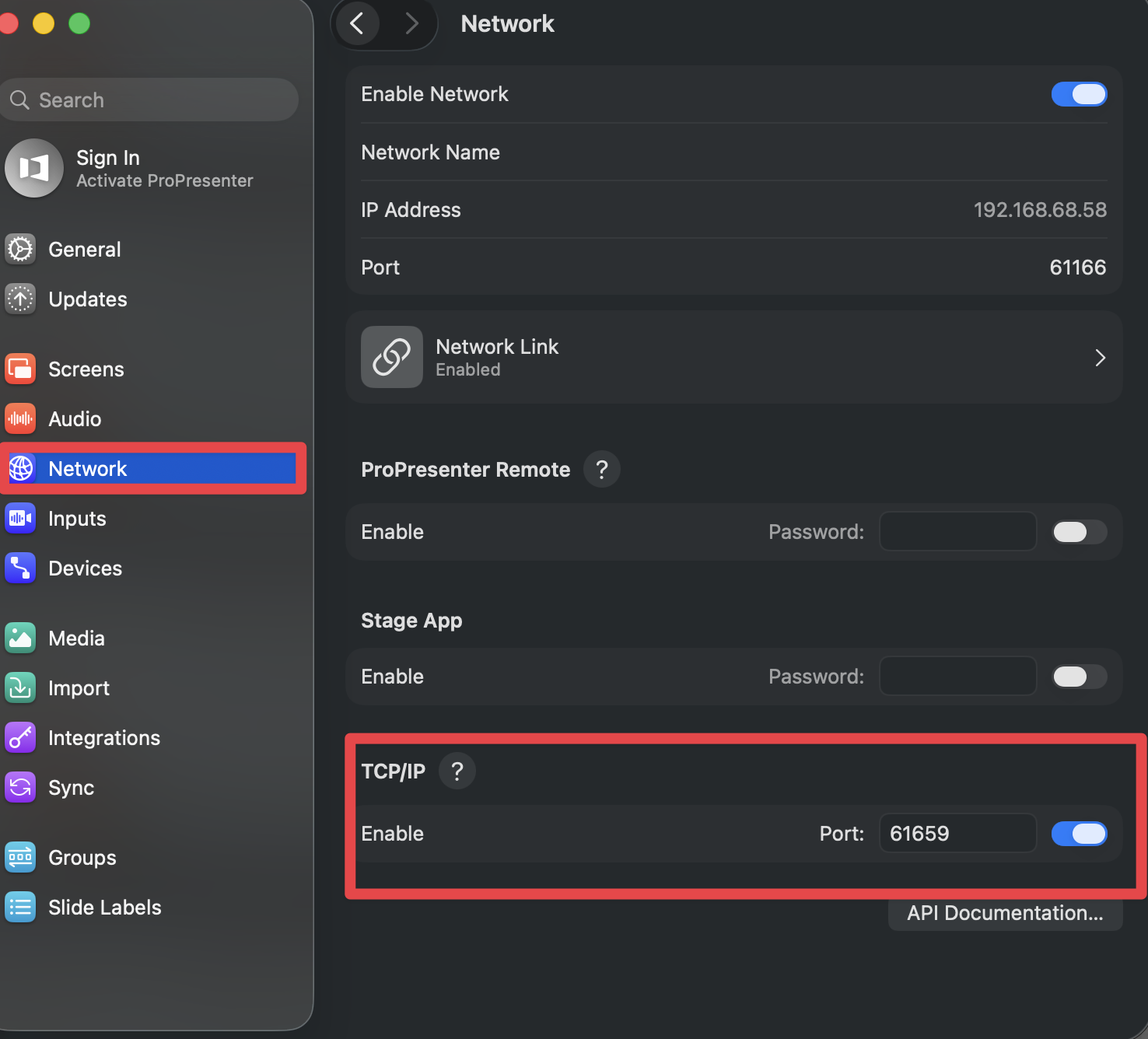
Why this matters: ProPresenter’s Network API is how this tool communicates with ProPresenter. Without it enabled, the tool cannot connect, read playlists, or export lyrics.
Connection details you’ll need:
- Host:
127.0.0.1(same computer) or the IP address shown in ProPresenter (remote computer) - Port:
1025(default) or whatever port is shown in ProPresenter’s Network settings
Installation
🖥️ Desktop App (Recommended)
The easiest way to get started with a full graphical interface.
Download:
- Go to GitHub Releases
- Download the latest version for your platform:
- macOS:
ProPresenter-Lyrics-vX.Y.Z-mac.zip - Windows:
ProPresenter-Lyrics-vX.Y.Z-win.exe
- macOS:
macOS Installation:
# 1. Unzip the downloaded file
unzip ProPresenter-Lyrics-vX.Y.Z-mac.zip

# 2. Fix Gatekeeper (one-time)
xattr -cr "/path/to/ProPresenter Lyrics.app"

# 3. Move to Applications
mv ProPresenter\ Lyrics.app /Applications/

# 4. Launch the app
open /Applications/ProPresenter\ Lyrics.app
Windows Installation:
- Run the installer (
.exe) - Follow the installation wizard
- Launch “ProPresenter Lyrics” from your Start menu
First Run:
- Open the app
- Enter your ProPresenter host and port
- Click “Connect & Load Playlists”
- Browse your playlists and export!
💻 CLI Executables (Advanced Users)
Lightweight standalone binaries for power users and automation.
Download:
- Go to GitHub Releases
- Download for your platform:
- macOS (Intel):
propresenter-lyrics-macos-x64 - macOS (Apple Silicon):
propresenter-lyrics-macos-arm64 - Windows:
propresenter-lyrics-win-x64.exe
- macOS (Intel):
macOS Setup:
# Make executable
chmod +x propresenter-lyrics-macos-x64

# Test connection
./propresenter-lyrics-macos-x64 status
Windows Setup:
# Test connection
propresenter-lyrics-win-x64.exe status
Environment Variables (Optional):
# macOS/Linux
export PROPRESENTER_HOST=192.168.1.100
export PROPRESENTER_PORT=1025

# Windows (PowerShell)
$env:PROPRESENTER_HOST='192.168.1.100'
$env:PROPRESENTER_PORT='1025'
🌐 Web Proxy App (Remote Access)
A menu bar app that lets remote users access ProPresenter Lyrics Export from any browser, anywhere in the world — secured with Google OAuth and Cloudflare Tunnel.
Download:
- Go to GitHub Releases
- Download the Web Proxy for your platform:
- macOS:
ProPresenter-WebProxy-vX.Y.Z-mac.zip
- macOS:
macOS Installation:
# 1. Unzip
unzip ProPresenter-WebProxy-vX.Y.Z-mac.zip

# 2. Fix Gatekeeper (one-time)
xattr -cr "ProPresenter Web Proxy.app"

# 3. Move to Applications
mv "ProPresenter Web Proxy.app" /Applications/

# 4. Launch — appears in menu bar (no dock icon)
open "/Applications/ProPresenter Web Proxy.app"
First Run:
- Click the broadcast icon in the menu bar → Settings…
- Enter your ProPresenter host (
127.0.0.1) and port (1025) - Optionally configure Google OAuth and Cloudflare Tunnel URL
- Click Save, then Start Server
See the full Web Proxy Guide for Google OAuth setup, Cloudflare Tunnel configuration, and troubleshooting.
📺 Live Viewer App (Congregation Devices)
A separate companion app that streams live slides to phones, tablets, and laptops on your network.
Download:
- Go to GitHub Releases
- Download the Viewer for your platform:
- macOS:
ProPresenter-Viewer-1.0.0-mac.zip - Windows:
ProPresenter-Viewer-1.0.0-win.exe
- macOS:
macOS Installation:
# 1. Unzip
unzip ProPresenter-Viewer-1.0.0-mac.zip

# 2. Fix Gatekeeper (one-time)
xattr -cr "ProPresenter Viewer.app"

# 3. Move to Applications
mv "ProPresenter Viewer.app" /Applications/

# 4. Launch — appears in menu bar (no dock icon)
open "/Applications/ProPresenter Viewer.app"
Windows Installation:
- Run the installer (
.exe) - Launch “ProPresenter Viewer” from the Start menu
- The app appears in the system tray (bottom-right)
First Run:
- Configure ProPresenter host and port in the settings window
- Click Test Connection to verify
- Click Save — the viewer URL is displayed
- Share the URL with your congregation (or display a QR code)
See the full Viewer Guide for detailed setup and usage.
Next Steps
Start Exporting Lyrics
- Desktop App Users: See the User Guide for how to export lyrics to PowerPoint
- Web Proxy Users: See the Web Proxy Guide for remote access setup
- CLI Users: See the CLI Guide for command reference
- Viewer Users: See the Viewer Guide for setup and sharing
- Customize your exports: Check the PPTX Export Guide for styling options
Advanced Features (Optional)
- Birthday Bucket: See the Birthday Bucket Guide to generate birthday blessing slides from ChurchSuite
- Service Generator: Check out the Service Generator Guide to automate service playlists from PDFs
Need Help?
- Having issues?: Check the FAQ for troubleshooting
Troubleshooting Setup
Connection refused?
- Make sure ProPresenter is running
- Check that Network API is enabled (Preferences → Network)
- Verify the host and port are correct
- If running remotely, ensure the network allows connections to port 1025
App won’t launch?
- macOS: Try the Gatekeeper fix:
xattr -cr "/path/to/ProPresenter Lyrics.app" - Windows: Ensure you have administrator rights to install
Still stuck?
- Check the FAQ for more detailed solutions
- Open an issue on GitHub
What’s Next?
- Ready to export? See the User Guide for desktop app and CLI workflows
- Want remote access? See the Web Proxy Guide for setup
- Want live slides for your congregation? See the Viewer Guide
- Want to customize? Check the PPTX Export Guide for styling options
- Need help? Browse the FAQ for common questions